A UAE hospital has 230 endpoints protected by EDR. Every endpoint reports healthy status to its managed SOC.
Looks good on the dashboard, right?
But what about the hospital’s radiology systems? Its EHR applications? The medical devices keeping patient care running?
If the SOC can’t see what’s happening across these systems, a healthy endpoint report doesn’t tell the whole story.
An attacker could move through the gaps without triggering the alerts the IT team expects. And in a hospital, that’s more than just a security problem. It could affect the systems doctors and nurses depend on every day.
So how much of the hospital can the SOC actually see?
That’s what this article sets out to answer. We’ll look at which systems a managed SOC should monitor, where visibility tends to fall short, and how hospitals can tell whether their provider is catching threats beyond the endpoints.
TL; DR
- EDR coverage isn't complete visibility: Even 230 protected endpoints can leave critical hospital systems unmonitored.
- Clinical systems need different monitoring: EHR and PACS require application logs. Medical devices may need network monitoring.
- Verify SOC coverage: Ask your provider to demonstrate what it can detect and where visibility is missing.
- ADHICS V2 compliance: Abu Dhabi hospitals must assess applicable monitoring controls and maintain supporting evidence.
- DC Technologies: Our managed SOC services help UAE hospitals identify visibility gaps and strengthen threat detection.
What Does a Healthy EDR Status Actually Tell You?
A healthy EDR agent tells you that the endpoint is reporting as expected. It doesn’t mean the security operations center can see every action happening across the hospital.
Take a radiology workstation connected to a PACS server for example, where medical images are stored. EDR might flag a suspicious process on the workstation. But if someone accesses patient scans through the PACS application, investigating that activity may require application audit logs.
That’s the difference between endpoint coverage and security visibility.
One tells you which devices have protection in place. The other tells you what the SOC can actually observe and investigate.
The same distinction applies to identity systems, cloud applications and network infrastructure. They may generate useful security data without running an EDR agent.
A managed SOC needs access to the right data sources, along with detection rules that help its analysts recognize suspicious activity. Otherwise, even a well-equipped SOC can end up investigating an incident with only half the evidence.
Which Hospital Systems Should a Managed SOC Monitor?
Start with the systems that store patient information, support clinical work or connect different parts of the hospital network.
Not all of them can run EDR. Some provide application logs, while others need network monitoring or vendor-supported security data. Your provider should explain how each critical system is covered.
Identity systems
Suspicious remote access, unusual traffic and attempts to move between systems.
Are firewall, VPN and relevant network logs being collected and reviewed?
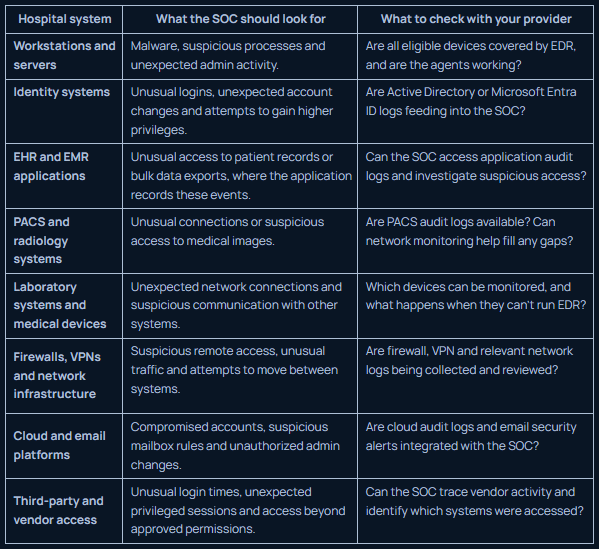
This isn’t a requirement to install the same security tool everywhere. The aim is to make sure important systems aren’t overlooked simply because they sit outside the usual endpoint security setup.
For each system, ask your provider three things: What data can you access? What suspicious activity can you detect from it? What would you be unable to see?
Those answers will tell you far more than a single endpoint coverage percentage.
Also Read – How to Choose an MDR Vendor: 10 Questions Experienced UAE Buyers Ask
How Does a SOC Monitor Medical Devices That Cannot Run EDR?
Medical devices are where hospital security gets a little tricky. You can’t treat an infusion pump like an office laptop and install whatever security software you want. Many devices have strict manufacturer requirements, and an unapproved agent could interfere with how they’re supposed to operate.
So, how do you keep an eye on them?
Start with what the devices are doing on the network. Network monitoring can help your SOC identify connected devices, understand which systems they communicate with and spot changes in those patterns.
Say an imaging device usually communicates with a particular hospital server. One day, it starts connecting to a system it has never contacted before. That alone doesn’t prove there’s an attack. There could be a legitimate reason for the change.
But someone needs to notice it, check what’s changed and decide whether it needs investigating. That’s the point of monitoring: not treating every unusual connection as a breach, but making sure suspicious activity doesn’t slip by unnoticed.
A hospital should work with its SOC provider to:
- Maintain an inventory of connected medical devices.
- Identify which network connections are expected for each device type.
- Monitor available network traffic and relevant security alerts.
- Document devices with limited telemetry and agree on alternative monitoring methods.
- Involve the device manufacturer when deeper investigation could affect clinical safety or device operation.
There are limits to what network monitoring can reveal. Encrypted traffic may hide the details of a communication, and network data won’t necessarily show which actions someone performed inside a clinical application.
The important thing is to know where those limits exist. A device that cannot run EDR shouldn’t automatically become a device nobody monitors.
Can Your SOC Connect Activity Across Hospital Systems?
It should be able to, as long as the right data is available and the SOC has detections and processes to connect the dots.
Say someone steals a hospital employee’s Microsoft 365 credentials and uses them to access the network.
First, the SOC might spot an unusual login. VPN logs could show how the person connected, while network data could reveal which systems they accessed. If they reached the hospital’s EHR, application audit logs could help establish whether patient records were viewed or changed.
Each log tells part of the story. The real value comes from putting those pieces together.
Without EHR audit logs, the SOC might know someone reached the clinical network but struggle to confirm what happened to patient records.
Ask your provider to walk you through this exact scenario. What evidence could they access? What would they be unable to confirm? Knowing where the investigation could hit a wall matters just as much as knowing what the SOC can detect.
How to Verify Your Hospital's Actual SOC Coverage
For a hospital with 230 EDR-protected endpoints, don’t stop at the agent-health report. Pick a few critical systems and ask your provider to show you what happens behind the scenes.
Four checks worth running
- Pick a system and trace its data. Start with your PACS or EHR. Ask the SOC to show you what security data it receives from that system. If it receives nothing, find out how suspicious activity would be detected.
- Ask for proof of detection. Don’t settle for “we monitor it.” Ask which suspicious activities the SOC can detect and how those alerts reach its analysts. Where practical, validate the setup through an authorized test.
- Walk through an incident. Give the SOC a scenario involving a compromised account accessing a clinical system. Ask what evidence it would use, what it could establish and where missing logs might limit the investigation.
- Find out what happens when coverage falls short. If a device can’t run EDR or an application doesn’t provide useful logs, who owns the gap? Agree on an alternative monitoring method, a responsible person and a date to review progress.
The outcome should be a short, actionable record of what the SOC can see, what it can detect and what still needs fixing.
Repeat the review when you introduce new clinical systems or change how vendors access the network. A coverage assessment is only useful if it keeps pace with the hospital.
Also Read – Your First 30 Days with MDR Services: What to Expect
What Does ADHICS V2 Expect From Security Monitoring?
For hospitals in Abu Dhabi, security visibility also ties into the requirements of the Abu Dhabi Healthcare Information and Cyber Security Standard (ADHICS V2).
Let’s go back to our hospital with 230 endpoints reporting healthy EDR status. Is that enough to show that security monitoring is working? Not by itself.
Your team needs to look at the monitoring and logging controls that apply to your environment. Are relevant systems generating the necessary logs? Are those logs being reviewed? Can the SOC investigate suspicious activity and escalate it when needed?
That means looking beyond endpoint health to understand what visibility you have across clinical applications and connected medical devices, where applicable.
To check the requirements for your organization, refer to the official ADHICS V2 standard and its implementation guidelines. You can also read our guide to ADHICS V2 compliance.
One thing to keep in mind: hiring a managed SOC doesn’t automatically make your hospital compliant. You still need evidence that the relevant controls are in place and working.
ADHICS applies to Abu Dhabi’s healthcare sector. If your hospital operates elsewhere in the UAE, check which regulatory requirements apply to your organization.
Found a Blind Spot? DC Technologies Can Help You Assess It
If your hospital has gaps in SOC visibility, the next step isn’t necessarily buying another security tool. It’s figuring out what your current setup can see, where the gaps are and how to close them without disrupting clinical operations.
DC Technologies helps UAE organizations assess and strengthen their cybersecurity through services such as managed security operations, security monitoring and vulnerability assessment.
For a hospital, that conversation could start with a few practical questions:
- Which critical systems are currently visible to your SOC?
- Where are logs missing or detection capabilities limited?
- How can you improve monitoring for devices that cannot run EDR?
- Are incident escalation and response responsibilities clear?
A useful assessment should leave your team with a clearer picture of its coverage, prioritized gaps and practical next steps, not simply a longer list of tools to buy.
If you’re reviewing SOC coverage across your hospital, DC Technologies can help you evaluate where visibility stands today and identify what needs attention next.
FAQs
What is the difference between EDR and a managed SOC?
EDR monitors devices such as computers and servers for suspicious activity. A managed SOC brings analysts and security tools together to investigate alerts and respond to threats across the systems it covers.
Can a SOC monitor medical devices without EDR?
Yes. Network monitoring can flag unusual connections from medical devices without installing software on them. The level of visibility depends on the device and the data available.
Does EDR protect all hospital systems?
No. EDR covers devices where its agent is installed and supported. Clinical applications, network equipment and medical devices may need other forms of monitoring.
How do I know if my hospital's SOC is monitoring all critical systems?
Ask for a list of monitored systems and log sources. Then check whether the SOC can demonstrate how it detects and investigates suspicious activity across them. Any gaps should have a clear plan for addressing them.
What logs should a hospital send to its SOC?
Common sources include endpoint alerts, login records, firewall and VPN logs, cloud audit logs, and EHR or PACS application logs where available. Your SOC provider should help identify which sources are needed to investigate threats in your environment.
Provider
Key capabilities
Particularly relevant for
- CYB3R
SME security packages, MDR, managed SOC, endpoint and email security
SME security packages, MDR, managed SOC, endpoint and email security
- DC Technologies
Managed security operations, security control configuration, MDR, SOCaaS and compliance-aligned controls
UAE SMBs seeking ongoing management of existing security investments
- EnCyb
Managed endpoint security, cloud security, MDR, SOCaaS and vulnerability management
Growing businesses seeking security and cloud operations under related managed services
- eShield IT Services
Managed SOC, vulnerability scanning, compliance reporting and incident response
Businesses wanting published endpoint-based SOC packages and UAE-hosted monitoring
- iConnect IT Business Solutions
Managed firewall, endpoint, identity, SIEM, cloud security and 24/7 SOC
Businesses requiring hands-on administration of multiple security controls
- Wattlecorp
Managed security, SOC deployment, SIEM, vulnerability management and on-site operations
Organisations seeking customised security operations and assessment services
- DTS Solution
HAWKEYE managed SOC, detection engineering, threat hunting and specialist security services
Technically complex mid-market environments requiring advanced security engineering