

Your first 30 days with an MDR provider in the UAE should take you from basic visibility to a working detection and response process.
By day 30, you should have clear metrics, known gaps, and a provider that understands what matters in your environment.
Here’s what good MDR services should look like, and the red flags to watch for.
TL; DR
- Week 1: Connect your security tools, map your environment, and find visibility gaps.
- Weeks 2–3: Tune detections, reduce false positives, and focus on real threats.
- By day 30: You should have clear security metrics, known gaps, and a working response process.
- Watch for red flags: Too many alerts, generic reports, poor communication, or no clear next steps.
- For UAE businesses: DC Technologies takes a hands-on approach to MDR, with 24/7 monitoring and response.
What Should Happen in Week 1 With a New MDR Provider?
Week 1 is about getting visibility before trying to fix anything.
A good MDR provider should spend this week understanding your environment, connecting the right data sources, and making sure the SOC can actually see what it is supposed to monitor.
What should happen?
- Kickoff: Define contacts, escalation paths, responsibilities, and critical systems.
- Asset discovery: Identify endpoints, servers, identities, cloud workloads, and other important assets.
- Integrations: Connect EDR/XDR, firewalls, identity platforms, cloud services, and relevant log sources.
- Coverage check: Confirm what the SOC can see and flag what it cannot.
- Environment mapping: Understand which systems are business-critical and what normal activity looks like.
- Regulatory context: Identify systems and data that may fall under UAE-specific requirements, depending on your industry and business operations.
What do good MDR providers do differently?
They don’t just push an agent and declare the environment “live.”
- They ask questions.
- They identify your critical assets.
- They validate the telemetry.
What should make you nervous?
If your MDR provider can’t tell you what is being monitored, what is missing, or who to contact during an incident, you’re not really through onboarding yet.
What Does Detection Tuning Look Like in Weeks 2–3?
This is where the MDR service should start getting smarter about your environment.
The first alerts will reveal what is normal, what is noisy, and what needs closer attention. A good provider uses that data to tune detections instead of simply forwarding everything to your IT team.
What happens during tuning?
- Baseline activity: Identify normal user, endpoint, and network behaviour.
- Reduce false positives: Remove repetitive alerts that don't represent meaningful risk.
- Tune detections: Adjust rules and thresholds to fit your environment.
- Activate use cases: Prioritize the threats most relevant to your business.
- Refine escalation:Make sure serious events reach the right people quickly.
What should you see?
Alert volume may change. That’s normal.
What matters is whether the quality of alerts improves.
You should start seeing clearer severity levels, better explanations, and fewer alerts that require your team to investigate for no reason.
Two red flags
- Constant alert flooding usually means the environment hasn't been tuned properly.
- Almost no alerts isn't automatically good either. It could mean strong security, or poor visibility and overly aggressive suppression.
A good MDR provider should be able to explain why your alert volume changed and what they changed to get there.
What Metrics Should You See by Day 30?
By day 30, you should have enough data to see whether the MDR service is actually improving your security operation.
Don’t expect perfect long-term benchmarks yet. The first month is about establishing a useful baseline.
The numbers that matter
- Coverage: What percentage of relevant assets and data sources are being monitored?
- Alert volume: Is noise increasing, decreasing, or becoming more meaningful?
- False positives: How much unnecessary activity has been filtered out?
- MTTD: How quickly are threats being detected?
- Detection tuning: How many rules or use cases have been refined?
- Incidents: How many were investigated, escalated, or contained?
Don't chase impressive numbers
A low alert count isn’t automatically good.
Neither is a low MTTD if the provider isn’t seeing enough of your environment.
The real question is whether visibility, detection quality, and response are improving.
By day 30, your MDR provider should be able to show you where you started, what changed, and what still needs work.
Red Flags After Your First 30 Days with an MDR Provider
By day 30, you should have a clearer picture of your security environment. If you don’t, something may have been missed during onboarding, tuning, or reporting.
Detection tuning hasn’t kept pace with the environment.
Visibility may be incomplete or detections may be too aggressively suppressed.
The provider is reporting activity instead of giving you security insight.
The MDR provider isn’t taking enough ownership of triage and investigation.
The provider hasn’t turned its visibility into meaningful risk assessment.
Incident-response responsibilities weren’t properly established during onboarding.
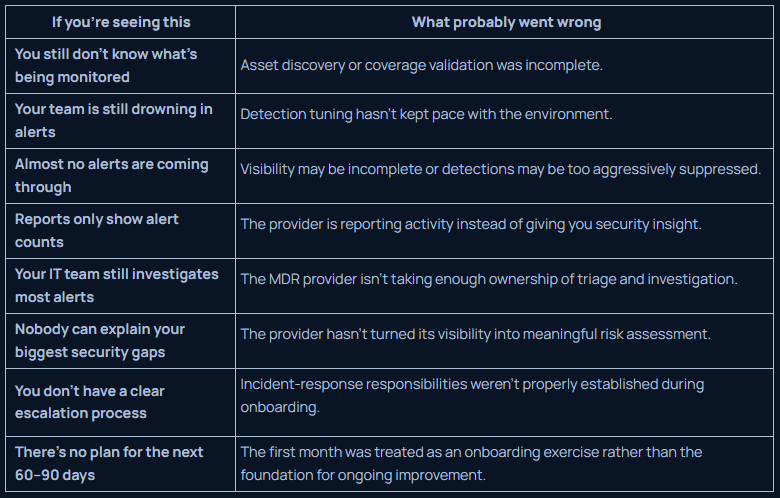
One red flag alone doesn’t mean the MDR is failing. But a pattern of them should make you ask why.
Conclusion
Can your IT team focus on the business instead of watching alerts? Can leadership understand the security picture without decoding SOC jargon? And when something serious happens, do you already know who is taking charge?
If the answer is yes, you’ve probably found the right operating model.
And if you’re evaluating MDR services in the UAE for your business, DC Technologies can help you assess what that should look like.
FAQs
What is MDR and do I really need it for my business?
MDR services provide continuous threat monitoring, detection, investigation, and response without building a full in-house SOC.
How much does managed detection and response cost?
Pricing depends on your environment, endpoints, integrations, and coverage. A managed security services provider can quote based on your actual requirements.
MDR vs internal SOC: which is right for my company?
MDR usually makes more sense when you need 24/7 coverage without the cost and complexity of building a dedicated SOC team.
What does a managed security service provider actually do?
A managed security services provider monitors your environment, investigates threats, and helps your team respond to genuine incidents.
How long does MDR onboarding take?
Most providers can establish initial visibility within the first few weeks, but meaningful detection tuning takes longer as the MDR service learns your environment.