
Moving from VMware to Sangfor HCI changes how your IT team manages VMs, handles capacity, deals with issues, and runs backup and disaster recovery.
If you’re considering a VMware alternative because of Broadcom’s licensing changes, the license price is only one part of the decision. This guide looks at what happens after migration, from VMware compatibility and day-to-day management to renewals, support, performance, backup, and recovery.
TL; DR
- VMware compatibility: Existing VMs and applications can move to Sangfor HCI without rebuilding the workloads.
- Day-to-day management: Core admin tasks stay familiar, while infrastructure management moves to a unified console.
- Licensing and costs: Sangfor offers more predictable perpetual or subscription pricing, but the full migration and support costs matter more than the license alone.
- Migration validation: Performance, backups, failover, networking, capacity, and rollback plans should be tested before production workloads move.
- Ongoing support: The right migration partner matters as much as the platform, especially for ongoing management and support.
Is Sangfor HCI Compatible with Your Existing VMware Setup?
The infrastructure layer changes. The workloads sitting on top of it mostly don’t.
A typical VMware environment has a few different pieces working together: ESXi for virtualization, vSAN for storage, and NSX for networking. With Sangfor HCI, those functions are brought together into one stack. aSV takes over the hypervisor role, aSAN handles storage, aNET handles networking, and aSEC provides built-in security.
That sounds like a big platform change. For the workloads, though, it usually isn’t.
Your VMs don’t need to be rebuilt just because the underlying hypervisor changes. Applications don’t suddenly need to be reconfigured to work on Sangfor. The goal is to move the workloads while changing the infrastructure underneath them.
What stays the same:
- VM structure and configuration
- Application compatibility
- Existing data, migrated without loss
What changes:
- The hypervisor, from ESXi to aSV
- The management layer, from vCenter workflows to Sangfor’s unified console
- How storage and networking are managed
The migration itself typically happens in three stages.
First, the existing environment is assessed and workloads are mapped so you know exactly what needs to move and in what order.
Then comes the migration. Instead of treating it as one big switch-over, workloads can be moved in a planned sequence to keep disruption to a minimum.
Finally, the part that often gets overlooked: ongoing management. With a Gold Partner-managed migration, the environment can move into ongoing AMC support rather than leaving your IT team to manage a completely new platform on their own.
How Does Day-to-Day Management Change After Migration?
The honest answer is that not much of the admin’s day-to-day work changes. Provisioning a VM is still provisioning a VM.
What changes is what happens when something looks wrong and you need to figure out why.
In a split VMware stack, a storage alert doesn’t necessarily mean the storage is the problem. The root cause could be a network bottleneck or a compute resource issue somewhere else in the stack. Finding that connection often means jumping between consoles and comparing timestamps to work out whether the events are related.
With Sangfor HCI, compute, storage, networking, and security are managed through a unified layer. That gives admins a single view of the environment, making it easier to trace an issue back to its source without moving between multiple management tools.
That may sound like a small change. In practice, it can be the difference between quickly checking what happened and having a ticket sit open while someone works out which system or team owns the problem.
The bigger adjustment is familiarity. An admin who has spent years working in vCenter knows where everything is almost without thinking. Moving to a new interface means rebuilding that muscle memory. The underlying concepts haven’t changed — VMs, resource allocation, networking, segmentation – but the way you access and manage them has.
So there is a learning curve. But you’re learning a new management experience, not relearning infrastructure from scratch.
A dedicated migration and support partner can also shorten that learning curve by helping your team with troubleshooting, platform administration, and the transition to the new environment.
What Happens to Licensing and Renewals Going Forward?
Broadcom didn’t just change VMware’s price. It changed who could sell and support it.
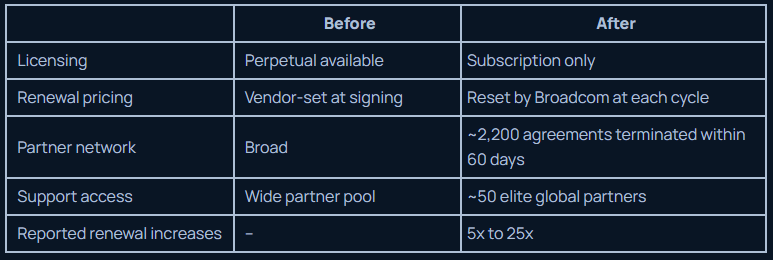
Sangfor isn’t necessarily cheaper. But its pricing is more predictable. And after dealing with repeated Broadcom renewal increases, that predictability can matter just as much as the price itself.
Comparing license prices alone can make the migration look cheaper or more expensive than it really is. Look at the full cost of owning and supporting the environment over the period you actually plan to run it.
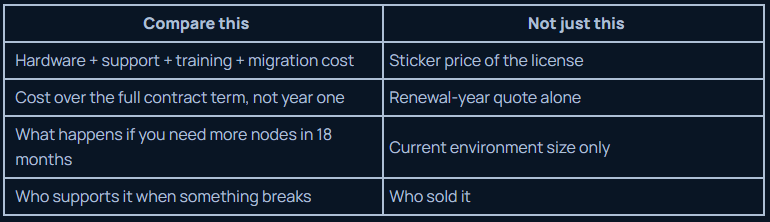
None of that shows up in a licensing quote. It shows up in the validation you do before you sign anything.
What Should You Validate Before Migrating from VMware to Sangfor HCI?
Planning the migration is relatively straightforward. What usually gets skipped is confirming the environment actually behaves the way you expect once the workloads are on the other side.
Test the parts that could cause problems after the move.
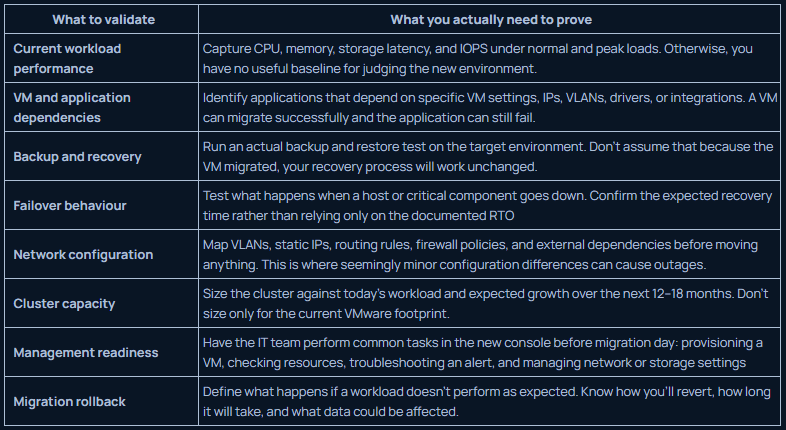
The important part is that these aren’t just questions for the vendor. Run the tests yourself.
Conclusion
Moving from VMware to Sangfor HCI changes more than the hypervisor. It changes how you manage infrastructure, plan licensing costs, and support the environment after migration.
The migration itself is only part of the decision. The right partner matters too.
DC Technologies is a Sangfor Gold Partner, handling the migration, UAE-resident infrastructure, and ongoing support.
If your VMware renewal is forcing the decision, start by mapping your current environment and comparing the full cost of switching.
FAQs
What is Sangfor HCI and how does it work?
Sangfor HCI combines virtualization, storage, networking, and security in one platform. It replaces VMware’s ESXi, vSAN, and NSX with aSV, aSAN, aNET, and aSEC.
How much will switching from VMware cost us?
It depends on hardware, support, training, and migration costs, not just licensing. Sangfor offers perpetual or subscription pricing, with costs agreed upfront.
Can we migrate from VMware without downtime?
Migration is planned in stages to minimize disruption. Some workloads may still require planned downtime.
Does moving to Sangfor HCI require retraining our IT team?
Not extensive retraining. The core concepts stay the same, but your team will need time to get familiar with the new interface.
Can existing VMware backups be carried over to Sangfor HCI?
Don’t assume they will work unchanged. Backup and recovery should be tested on the new platform before migration is complete.