
Calculating acceptable downtime starts with one question: What does every minute of an outage cost your business?
RTO (Recovery Time Objective) and RPO (Recovery Point Objective) are business decisions expressed as technical targets. RTO defines the maximum downtime your operations can absorb before the impact becomes unacceptable. RPO defines the maximum amount of data you can afford to lose without disrupting operations, breaching obligations, or creating costly rework.
The right targets depend on your revenue, customer commitments, operational dependencies, and regulatory requirements – not on what your backup software supports.
This article walks through a practical way to determine recovery targets that reflect how your business actually operates.
TL; DR
- Calculate Downtime Costs: Measure the financial impact of outages before setting RTO and RPO.
- Set Recovery Targets: Define RTO and RPO based on business operations, customer commitments, and compliance requirements.
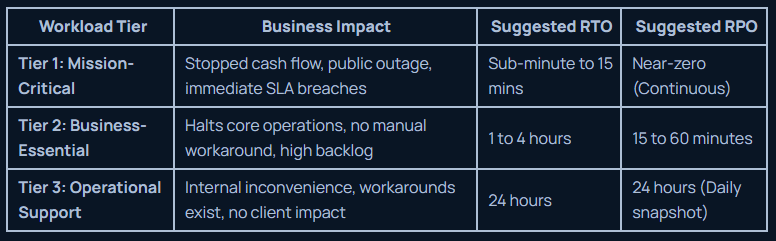
- Prioritize Critical Systems: Different workloads need different recovery objectives to balance resilience and cost.
- Validate Recovery Readiness: Ensure your disaster recovery plan and infrastructure can consistently meet your recovery targets.
- Modernize for Resilience: Platforms like Sangfor HCI help simplify recovery and support stronger business continuity.
How to Calculate Your True Cost of Business Downtime
Most downtime calculations miss the hidden operational costs that compound during an outage. Finding your actual risk exposure requires looking beyond lost immediate sales.
Direct Financial Loss
Add up your average online revenue per hour, unbilled service hours, and lost transaction processing during a full system freeze.
Idle Employee Overhead
Multiply the total hourly compensation of affected staff by the duration of the outage. Include the extra hours required after systems come back online to clear work backlogs and handle customer tickets.
Contractual and Regulatory Penalties
Factor in the exact Service Level Agreement (SLA) payout credits, compliance fines, and legal costs if you fail to meet client commitments.
The Simple Hourly Downtime Equation
Use this formula to establish a baseline hourly financial risk:
Hourly Downtime Cost = Lost Hourly Revenue + Hourly Staff Compensation + Hourly SLA Penalties
Once you know what an hour of downtime costs, you can set clear recovery targets that protect your revenue without blowing your budget.
How to Turn Downtime Costs into Realistic RTO and RPO Targets
Instead of asking what your backup tool can do, ask what happens to the business when a specific application stops working.
You can derive realistic RTO and RPO numbers by walking each workload through five core operational questions:
- Which process stops entirely?
If a payment system freezes, revenue stops instantly. That needs a recovery target measured in minutes.
- Can the staff work manually?
If teams can use spreadsheets during an outage, you can accept a longer downtime. If no manual option exists, your recovery time must be short.
- How fast do customers notice?
Public portals crash and hurt trust immediately. Internal wikis can stay offline for hours without hurting clients.
- Do contracts or laws force your hand?
Client SLAs and regulatory rules often dictate strict timelines. Missing them triggers instant fines or lost contracts.
- What costs more: fast recovery or the outage itself?
Near-instant recovery requires duplicate servers and continuous sync. If cutting downtime costs $100,000 a year, but the outage only loses $5,000, the extra speed is a waste of money.
These answers give you realistic targets. Your RTO becomes the exact moment downtime gets too expensive. Your RPO becomes the amount of lost data your team can handle re-entering without breaking operations.
Does Every Application Need the Same Recovery Target?
Are Your Current Recovery Targets Achievable?
Many organizations define RTO and RPO based on business expectations but never validate whether their existing environment can support those numbers.
A few questions reveal the gap:
- Can your infrastructure recover automatically, or does recovery depend on manual intervention?
- How long does it take to restore critical applications after a failure?
- Are your backup systems tested regularly, or are they only assumed to work?
- Do you know which systems depend on each other during recovery?
If those questions expose weaknesses, the answer isn’t always more backups. Recovery outcomes also depend on the infrastructure supporting your workloads.
Why Your Recovery Strategy Needs More Than Just Backups
Backups are essential for recovering lost data, but they are only one part of meeting your recovery objectives. If your underlying infrastructure is slow, complex, or difficult to restore, even a reliable backup strategy may not help you achieve your target RTO.
We help businesses build recovery-ready environments by combining backup and disaster recovery solutions with modern infrastructure platforms like Sangfor HCI.
Our Backup & Disaster Recovery services help protect critical business data through structured backup strategies, recovery planning, and faster restoration when disruptions occur.
Meanwhile, Sangfor HCI provides a more resilient infrastructure foundation by integrating compute, storage, virtualization, and networking into a single platform – reducing complexity and improving workload availability.
Together, these solutions help businesses move from simply having backups to having a recovery strategy designed around their actual operational needs.
Conclusion
Downtime becomes expensive when businesses discover too late that their recovery plans were built around assumptions instead of operational needs. RTO and RPO provide the clarity needed to prioritize workloads, allocate resources, and make smarter resilience decisions.
At DC Technologies, we help businesses evaluate these requirements and build infrastructure strategies that support their recovery goals – from backup and disaster recovery planning to modern infrastructure platforms designed for greater resilience.
The goal is not to eliminate every second of downtime; it is to understand what your business can tolerate and build a recovery approach that matches those priorities.
FAQs
What's the difference between business continuity and disaster recovery?
Business continuity focuses on keeping critical business operations running during a disruption. Disaster recovery focuses on restoring the systems and data that support those operations after an incident.
What should be in a disaster recovery plan?
A disaster recovery plan should identify critical systems, define RTO and RPO targets, document backup and recovery procedures, assign responsibilities, and include regular recovery testing.
How do I create a disaster recovery plan for my business?
Start with a Business Impact Analysis (BIA) to identify critical workloads. Then define recovery objectives, document recovery procedures, implement backups, and test the plan regularly.
How do I know if my business can survive an emergency?
Review how long your critical operations can function without key systems, whether employees have manual workarounds, and if your recovery capabilities align with your business requirements.
How much data can your business afford to lose?
It depends on how often your data changes and the cost of recreating it. Critical transactional systems usually require minimal data loss, while less critical workloads can tolerate longer recovery points.
How long can your business survive without access to critical systems?
The answer varies by workload. Customer-facing and revenue-generating systems often require recovery within minutes, while internal support systems may tolerate longer downtime.